
SDK Guide
The AQUARM SDK converts a target pose into joint angles, generates a trajectory, and sends commands to the robot through KCAN.
Requirements
- Linux x86_64; Ubuntu 22.04 or later is recommended.
- CMake, a C++17 compiler, and Eigen3 for C++ examples.
- CPython 3.10 for the bundled Python extension modules in
python/.
sudo apt install cmake g++ libeigen3-devDownload and Build
git clone https://github.com/kalman-kr/aquarm_sdk.git
cd aquarm_sdk
cmake -S . -B build
cmake --build build -j
Run these commands from the SDK root to check kinematics and trajectories without sending robot commands:
ctest --test-dir build --output-on-failure
python3.10 python/test_ik.py
Workspace Structure
aquarm_sdk/
├── CMakeLists.txt
├── include/        # C++ headers: kalman_ik.hpp, kcan_sdk_user.h
├── example/
│   ├── cpp/        # joint_kcan.cpp, ik_kcan.cpp
│   └── python/     # joint_kcan.py, ik_kcan.py
├── lib/            # Prebuilt IK and KCAN shared libraries
├── python/         # CPython 3.10 extension modules and IK smoke test
├── resources/
│   ├── urdf/       # aquarm_origin_with_gripper.urdf
│   └── meshes/
├── simulator/
│   └── MuJoCo/     # Simulator script and MJCF model
└── test/           # C++ IK and trajectory tests
The standalone AQUARM Description repository provides URDF/Xacro models and ROS 2 viewers. See ROS for visualization and MuJoCo for the SDK simulator.
Run the KCAN Examples
The examples use controller IP 192.168.1.9 and ports 20000 / 20001. Update the connection settings in the example source for your setup, then rebuild if you changed a C++ example. These programs send motion commands to the connected arm.
./build/joint_kcan
# Or run the target-pose IK example:
./build/ik_kcanpython3.10 example/python/joint_kcan.py
# Or run the target-pose IK example:
python3.10 example/python/ik_kcan.pyUse Ctrl+C to stop an example. If send_operational failed appears, check the KCAN device and network connection.
Integrate into a C++ Project
Place aquarm_sdk/ inside your project and link the imported ik_sdk target:
add_subdirectory(aquarm_sdk EXCLUDE_FROM_ALL)
target_link_libraries(my_app PRIVATE ik_sdk)
Include kalman_ik.hpp in your application. Avoid -mavx and -march=native, which can change Eigen alignment assumptions relative to the prebuilt IK library.
IK example
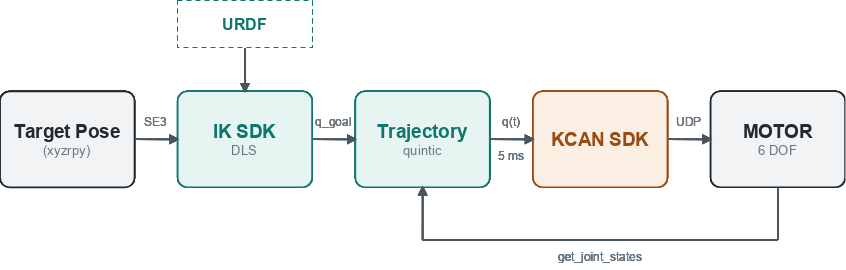
Code
The Python example belongs in example/python/ik_kcan.py so that SDK_ROOT resolves correctly. The CMake target ik_kcan supplies AQUARM_URDF for the C++ example.
#include "kalman_ik.hpp"

#include <kcan_sdk_user.h>

#include <algorithm>
#include <chrono>
#include <csignal>
#include <thread>
#include <vector>

constexpr double kMaxJointVelocity = 0.5;
constexpr double kMinDuration = 1.0;

static volatile std::sig_atomic_t running = 1;

int main() {
  std::signal(SIGINT, [](int) { running = 0; });

  //Target pose
  const auto robot = kalman::model::loadUrdf(AQUARM_URDF);
  const size_t joint_count = robot.jointCount();
  const auto target = kalman::math::se3FromXyzRpy(
      kalman::math::Vector3(0.10, -0.30, 0.10),
      kalman::math::Vector3(0, 1.57, 0.0));

  //Connect KCAN
  kcan_user::KcanUserSDK sdk(static_cast<int>(joint_count));
  if (!sdk.connect("192.168.1.9", 20000, 20001)) return 1;
  const auto fail = [&] {
    sdk.send_stop();
    sdk.disconnect();
    return 1;
  };
  if (!sdk.send_operational(0x00, 0.005f)) return fail();

  //Get Joint feedback
  std::this_thread::sleep_for(std::chrono::milliseconds(100));
  const auto states = sdk.get_joint_states();
  if (states.size() != joint_count) return fail();
  kalman::math::VectorX start(joint_count);
  for (size_t i = 0; i < joint_count; ++i) start[i] = states[i].position;

  //Solve IK from the current pose (nearest solution, no multi-turn unwinding)
  const auto ik = kalman::kinematics::solveDlsIk(robot, target, start);
  if (!ik.converged) return fail();
  const kalman::math::VectorX& goal = ik.joint_angles;

  //Calculate Trajectory
  const double duration = std::max(
      kMinDuration, 1.875 * (goal - start).cwiseAbs().maxCoeff() / kMaxJointVelocity);

  std::vector<float> command(joint_count);
  const auto t0 = std::chrono::steady_clock::now();
  while (running) {
    const double t = std::chrono::duration<double>(std::chrono::steady_clock::now() - t0).count();
    const auto q = kalman::trajectory::quinticInterpolate(start, goal, t, duration).position;
    for (size_t i = 0; i < joint_count; ++i) command[i] = static_cast<float>(q[i]);
    //Send KCAN command
    sdk.send_joint_command(command);
    std::this_thread::sleep_for(std::chrono::milliseconds(5));
  }

  sdk.send_stop();
  sdk.disconnect();
  return 0;
}import sys
import time
from pathlib import Path
SDK_ROOT = Path(__file__).resolve().parents[2]
sys.path.insert(0, str(SDK_ROOT / "python"))
import kalman_ik_py as ik
from kcan_sdk_user_py import KcanUserSDK
MAX_VEL = 0.5 # rad/s
#Target pose
XYZ = [0.10, -0.30, 0.10] # m
RPY = [0.0, 1.57, 0.0] # rad
robot = ik.model.load_urdf(str(SDK_ROOT / "resources/urdf/aquarm_origin_with_gripper.urdf"))
JOINT_COUNT = robot.joint_count()
#Connect KCAN
sdk = KcanUserSDK(JOINT_COUNT)
if not sdk.connect("192.168.1.9", 20000, 20001):
raise SystemExit("connect failed")
try:
#Set position mode and start sync
if not sdk.send_operational(0, 0.005):
raise SystemExit("send_operational failed")
#Get Joint feedback
time.sleep(0.1)
start = [s.position for s in sdk.get_joint_states()]
if len(start) != JOINT_COUNT:
raise SystemExit(f"expected {JOINT_COUNT} joint states, got {len(start)}")
#Solve IK from the current pose (nearest solution, no multi-turn unwinding)
result = ik.kinematics.solve_dls_ik(robot, ik.math.se3_from_xyz_rpy(XYZ, RPY), start)
if not result.converged:
raise SystemExit("IK failed")
goal = result.joint_angles
#Calculate Trajectory
duration = max(1.0, 1.875 * max(abs(g - s) for g, s in zip(goal, start)) / MAX_VEL)
#Send KCAN command
t0 = time.monotonic()
while True:
q = ik.trajectory.quintic_interpolate(start, goal, time.monotonic() - t0, duration).position
sdk.send_joint_command(q)
time.sleep(0.005)
except KeyboardInterrupt:
pass
finally:
sdk.send_stop()
sdk.disconnect()